
How can we help you?
Exaira is a package and freight forwarder that can assist you with shopping & shipping solutions from the USA to global shoppers all around the world. Our mission is to serve our global customers with the most affordable, fast, and reliable package and freight forwarding services.
Simply follow these steps to shop & ship from the USA:
- Step 1: Sign up & get your US address
- Step 2: Shop at your favorite US stores
- Step 3: Send your purchases to our facility
- Step 4: Ship your packages to your address
- Step 5: Sit back and relax until you receive your packages
To learn more, go to How It Works page.
Yes, you are required to sign up or register on our website before using our services or the US address.
Simply click the Sign Up button on the top right-hand corner as shown. You will be redirected to the Sign Up page and key in all the required information.
No, there is no sign up, registration, or setup fee, no subscription or monthly payments, and also no credit card required at sign up.
Your password must
- at least 8 characters long
- contain a lowercase letter
- contain an uppercase letter
- contain a number or special character
This could be because of several reasons:
- You did not provide a valid email address.
- Your password did not meet the minimum requirement.
- The "Confirm Password" did not match with the password that you've entered.
- You did not toggle "I accept the Terms & Condition".
Please check your spam inbox in case the verification email may have been sent there. If you're still having this issue after 4 hours, even after you have checked the spam inbox, kindly contact us for further steps.
Click the Login button on the top right-hand corner. You will be redirected to the Login page.
For tablet and mobile view, click the ≡ button and click the Login button as shown.
You can reset your password by clicking "Forgot password?" on the Login page. Enter your email address and click "Reset Password" button. You will receive an email from us to reset your password and simply follow the steps.
This will happen if you enter the wrong email address or your password or both. There is also a possibility the reCAPTCHA marked you as a bot. If the reCAPTCHA error message appears, kindly close the browser and go to the login page again.
If this keeps happening, even if you entered the right information, please let us know immediately.
Log into your account then locate your Exaira address on the right-hand section of the Dashboard, titled "U.S. Address". You may copy or use the US address when shopping at US online stores.
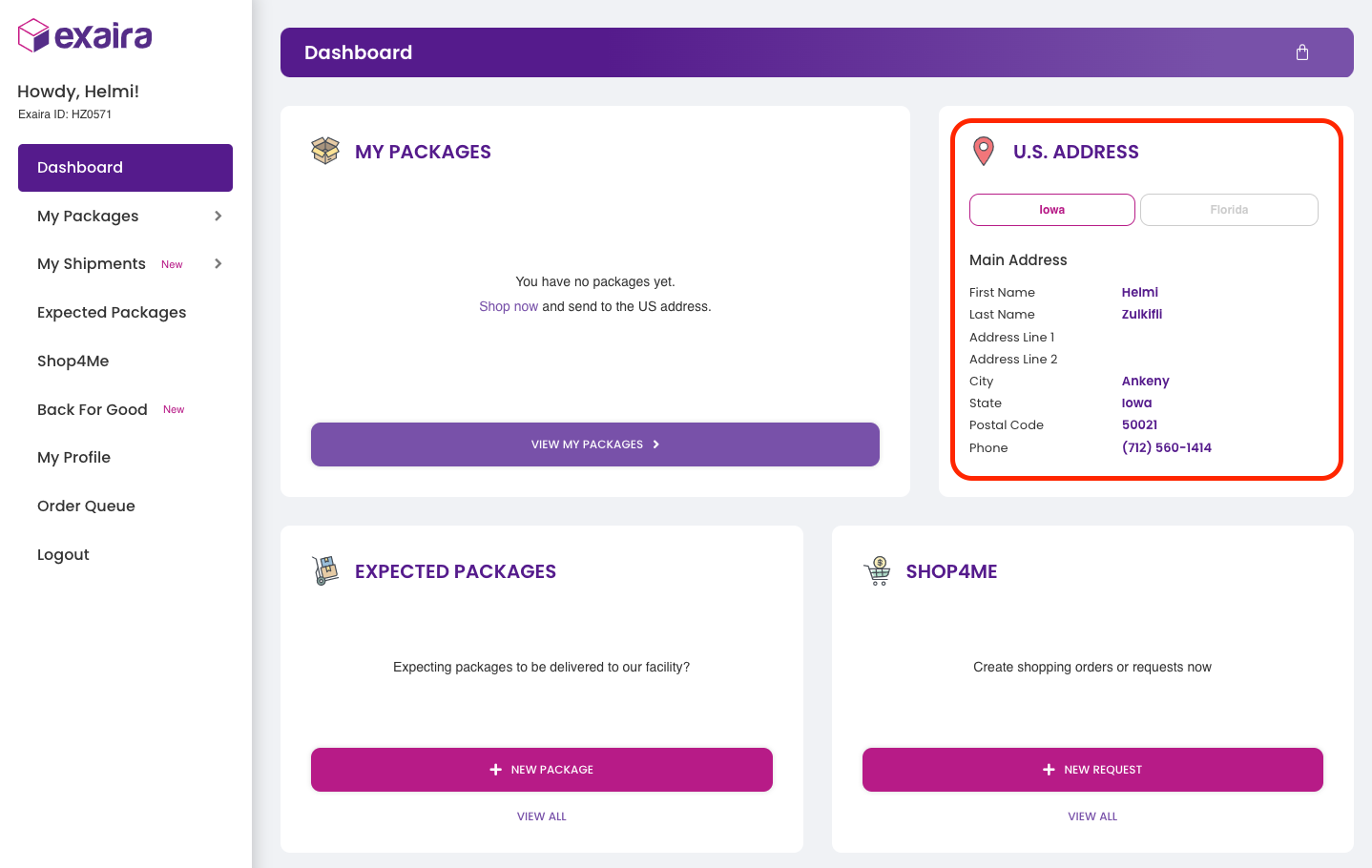
When entering the address at checkout, please always remember to include your Exaira unit number. If the unit number is not listed on the package, it will create delays and there will be an additional fee to locate your package which may prevent us from being able to assign the package to your account.
Your default address is our Iowa facility which can offer up to 60 days of package storage duration and can take care of international air and sea freight (sea freight is only to Malaysia). You may also ship to your tax-free address in Florida and this facility can only ship out packages via air.
Yes, you can start using our services immediately after you have completed the registration and email verification. Simply use your new Exaira address when checking out at any online store and send your first package to us.
Exaira provides you with a US address that you can purchase from online retailers in the US and ship worldwide. If you are unable to ship to our facility, or if your order is canceled by the retailer and they tell you that they will not ship to us, kindly contact us.
We also offer you a convenient Shop4Me service where we can shop or purchase on your behalf.
The screenshot below is the typical checkout screen and how to enter your information and Exaira US address. Should you have any questions about using your Exaira address on an online store or retailer's website, kindly submit a support ticket through your Exaira account. Our customer support agent will be glad to assist you.

My Packages page contains all information about your current packages. You can view detailed information about your packages, including package labels and content photos. You also can request a shipment once our team finished repacking or consolidating your packages.
To view the My Packages page, from the Dashboard, go to "My Packages" or click "View My Packages" button.
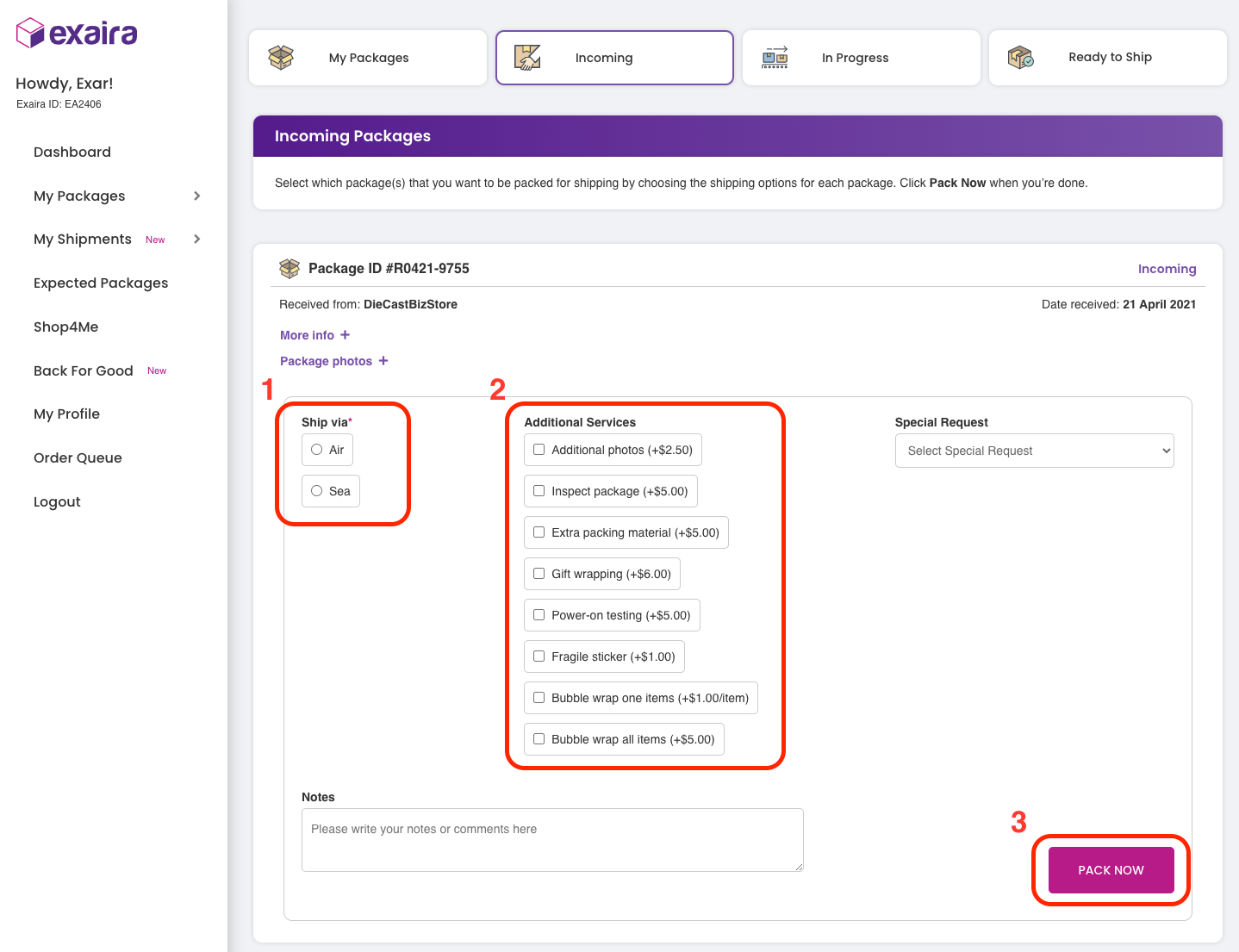
Simply follow these steps:
- Login to your account
- Go to My Packages > Incoming
- Choose packages you would like to request for repacking
- Check shipping method or any additional services
- Click "Pack Now" button
- We will receive your request and are ready to repack or consolidate your packages
Your current packages will change their status from "Incoming" to "In Progress" which shows that our team is preparing your packages for shipment. If you have special instructions for us, kindly leave us a note.
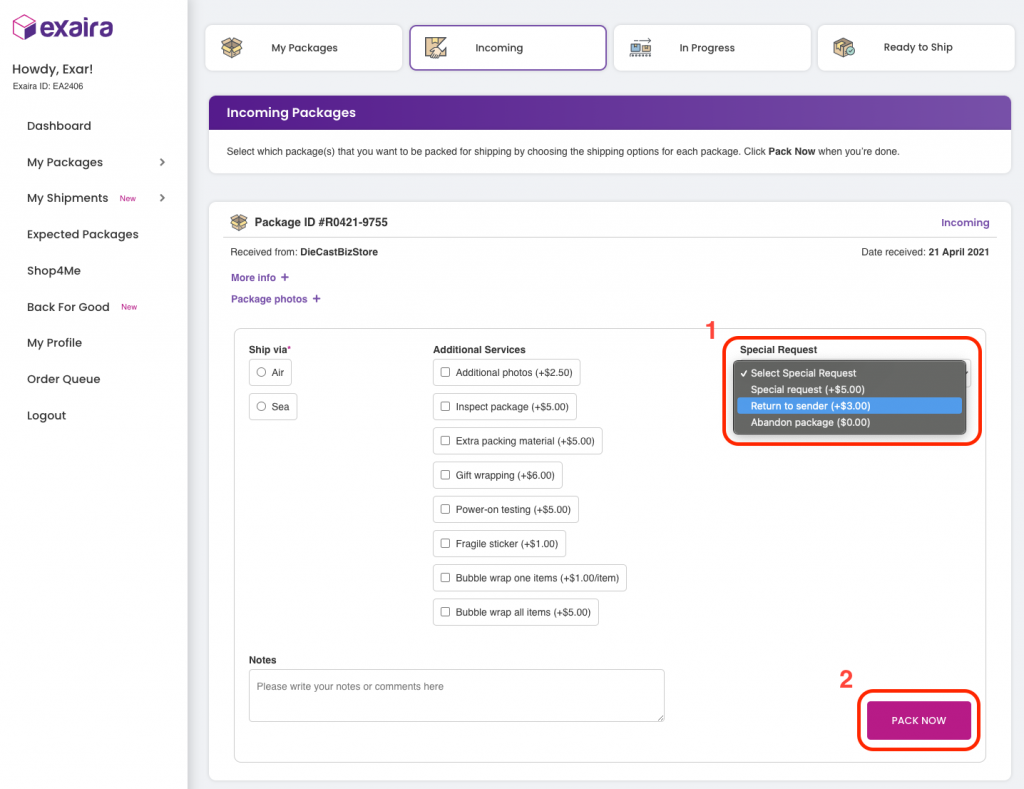
No worries, we can assist you to return the items or packages back to the merchant or seller to issue a refund or exchange. Here are the steps:
- Login to your account
- Go to My Packages > Incoming
- Select "Return to sender" under Special Request
- Click "Pack Now"
- We will be notified and let you know the next steps to return the packages
You're welcome to contact our customer service agent prior to notifying our team about the return process.
Once you submit the "Pack Now" request, our team will be notified to repack your packages. The only way to cancel the "Pack Now" request is by contacting our customer support agent.
You will be notified via email once we have completed repacking or consolidating your packages. Next, simply follow these steps:
- Login to your account
- Go to My Packages > Ready to Ship
- You'll be given a Shipment ID. Click "Ship Request" to ship your packages
- Review your shipment details
- Click "Ship Now" and you'll be redirected to Order Queue.
- Click "Proceed to Checkout" to fill out the billing & shipping address and make payment.
- Our team will ship your packages to you
Once we ship your packages, you will be given either a tracking number or the current status of your shipment via email or WhatsApp. You can track or get the status of your shipment by following these steps:
- Login to your account
- Go to My Shipments > En Route
- You can view your shipment's current status
If you did not receive any updates from our team, please contact us immediately.
Simply follow these steps:
- Login to your account
- Go to My Shipments > History
- You can view the list of your past shipments
If there is missing info or missing past shipments, please contact our team immediately.
"Expected Packages" is a feature where you can tell us about your purchases that will be shipped to our facility. It's important to notify our team in case your packages go missing or are misplaced.
There are two methods to submit your Expected Packages. The first is through the Dashboard, whereas another one is by going to the Expected Packages page.
Method 1 (Dashboard)
- Login to your account
- On the Expected Packages section, click "New Package"
- Fill out the form and click "Add Package" to submit
- Our team will be notified and be ready to receive your packages
Method 2 (Expected Packages)
- Login to your account
- Go to "Expected Packages"
- Click "Add Package"
- Fill out the form and click "Add Package" to submit
- Our team will be notified and be ready to receive your packages
If you have not received the tracking number yet, no worries. You can edit the submission later on once you get the tracking number from the merchant. If you made a mistake with the submission, you can delete it as well.
Shop4Me is one of our services that can assist you to purchase items on your behalf in case the merchant declines your payment methods or you're unable to make purchases.
There are two methods to submit the Shop4Me request. The first is through the Dashboard, whereas another one is by going to the Shop4Me page.
Method 1 (Dashboard)
- Login to your account
- On the Shop4Me section, click "New Request"
- Fill out the form and click "Shop4Me This!" to submit
- Our team will be notified and be ready to assist you further
Method 2 (Shop4Me)
- Login to your account
- Go to "Shop4Me"
- Click "New Request"
- Fill out the form and click "Shop4Me This!" to submit
- Our team will be notified and be ready to assist you further
Before submitting, ensure that you entered the right info and details. Once you submit, please make the deposit payment of 50% of the total price. The link of the deposit payment can be found on the Shop4Me page.
Back For Good plan is a shipping plan that is specifically designed for Malaysians who reside in the US, especially Malaysian students and expatriates.
The shipping rates and fee for the Back For Good plan are different than the regular Super Saver plan. You can view the rates and fees on the Back For Good page and on the Pricing page as well.
The steps are easy:
- Login to your account
- Go to the "Back For Good" page and review the important dates, pricing and terms & conditions
- Click "Book Now" and fill out the booking form
- Pack your things
- Click "Customs Form" and fill out the Customs declaration form
- Contact us to schedule a pickup or to drop off your boxes
You can learn more details about the steps by downloading the "Shipping Guide".
Simply scroll down the Back For Good page and you can find the submitted booking details and Customs form at the bottom part of the page. If you have trouble finding it, kindly contact our team to assist you further.
It's easy. Follow these steps:
- Login to your account
- Go to "My Profile"
- Click "Account Information"
- Update your first name, last name, and/or email address
- Hit "Save Changes"
Follow these steps:
- Login to your account
- Go to "My Profile"
- Click "Account Information"
- Update your password
- Hit "Save Changes"
Follow these steps:
- Login to your account
- Go to "My Profile"
- Click "The Exaira Club"
- Check your Purple Stars reward
- Hit "Save Changes"
Same as a shopping cart, the order queue would list all of your shipments orders or any add-ons before checking out to make payment.
Yes! We called the service as Shop4Me service where we can purchase the goods and items on your behalf while the merchants or retailers do not accept foreign-issued credit cards or they simply decline your payment methods.
There are plenty of US online retailers and stores that you can shop. We have listed some of the suggested US stores here for you to browse and get an idea of what kind of goods you're looking for to shop online at US stores.
Shop4Me is a service that can assist you to purchase goods or items on your behalf. Some of the retailers and merchants do not accept foreign-issued credit cards or simply rejected your transaction because of your location outside of the US. The best way to purchase items due to those restrictions is by using the Shop4Me service. We will charge 6% of the total purchase as a service fee.
The Shop4Me service fee includes a handling fee for purchasing your items, a processing fee when we receive them at our facility, and a return the item fee in case we received the wrong or different items from the merchant. We collect 6% of the total purchase as a service fee for an order with a minimum charge of US$10. For example, if the items cost US$100, the service fee would be US$6. However, the minimum charge is US$10. Hence, the total cost plus the service fee would be US$110.
Yes! The Shop4Me service can place your customized or personalized orders. Simply fill out the Shop4Me request form with the details of the customizations that you wanted.
Before purchasing any items, we will always confirm the price and availability with you. If the item is sold out or the price is higher than you expected, you can cancel your request without any additional fees or penalties.
You can request to purchase "Buy It Now" items from eBay with Shop4Me. However, we cannot purchase any auction items that require bidding.
No. The Shop4Me service can only be used for tangible merchandise purchases only and cannot be used to pay for any type of services such as subscriptions, memberships, utility bills, electronic downloads, gift certificates, credit card payments, and internet services.
All requests can be changed or canceled before you confirm and make the payment for your request. However, your requests may not be changed, canceled, or refunded after we have already purchased the requested items.
If the item you received is not what you purchased or is not what you expected based on the description from the merchant, kindly contact our team as soon as possible for further assistance. Normally, what would we suggest is requesting to return the items to the merchant and we will guide you on how to return them as long as the items are still at our facility.
You may contact the merchant or seller directly to get the status of your purchase or tracking number. If you have problems contacting the merchant, kindly contact us and we will assist you further.
"Expected Packages" is a feature where you can tell us about your purchases that will be shipped to our facility, especially after you have received the tracking number from the merchant. It's important to notify our team in case your packages go missing or are misplaced.
Yes. We will notify you via email once your package is checked in and entered into your account. Make sure to check your spam box if you don't receive the email.
The carrier may have been trying to deliver the package outside of business hours. Please ask your courier to only attempt the delivery 10am - 5pm Monday-Friday except for U.S. holidays.
Once we receive the packages, it can take up to 2 business days to appear in your account. If you notice the packages do not appear in your account after 2 business days, then there is a possibility we were not able to process your packages. Kindly contact our team immediately to assist you further.
Many packages are delivered to our facility each day. Depending on the time of the year, once we receive the packages, it can take up to 2 business days to appear in your account. Kindly contact our team immediately to assist you further if you notice the packages do not appear in your account after 2 business days.
Yes. We open every package when it arrives at our facility. Our trained package handlers carefully review your purchases to ensure they are legal for export from the USA. It is a best practice to request a package inspection to ensure the items that you purchased are in great condition and were not broken during shipping.
However, if you do not allow us to open and/or inspect your package, please let us know immediately after you made the purchase. You will not be charged for the processing fee, if only you tell us before the packages arrive at our facility. You will still be charged if the packages have been checked in and assigned to your account.
Yes. However, if you do not allow us to open and/or inspect your package, please let us know immediately after you made the purchase. You will not be charged for the processing fee, if only you tell us before the packages arrive at our facility. You will still be charged if the packages have been checked in and assigned to your account.
You will receive 30 days (ship via air) and 60 days (ship via sea) of free package storage. Packages stored past the free storage period will incur storage fees at the rates shown below. Storage fees continue to accrue until your package is shipped, discarded, or returned to the sender.
Economy & Standard Plans
Day 1 to Day 30 --- FREE
Day 31 to Day 60 --- $1.00/day
> Day 60 --- $2.00/day
Super Saver & Back For Good Plans
Day 1 to Day 60 --- FREE
Day 61 to Day 90 --- $1.00/day
> Day 90 --- $2.00/day
Yes, there is overweight and oversized surcharge applied to any packages that exceed 30 lbs or 48 inches.
Overweight Surcharge
Economy & Standard Plans
30 up to 69 pounds --- $10
70 up to 99 pounds --- $25
Over 100 pounds --- $50
Super Saver & Back For Good Plans
Over 50 pounds --- $4.50/cft for every 25 pounds
Oversized Surcharge
Over 48 inches --- $50
You can estimate your shipping costs by looking at the description of the items or by asking the merchant for the weight and dimensions of the package before you purchase the items.
The shipping rate for each outbound parcel is calculated at mail out. For Economy & Standard plans, the shipping rate is US$6.50/cft + US$11.90 (base charge). On the other hand, the shipping rate for Super Saver is US$12.00/cft + US$2.90 (base charge) and for Back For Good is as low as US$10.50/cft + US$3.90 (base charge).
There are several ways to save more on international shipping rates with Exaira.
- Consolidation
- Consolidating your packages by sending them together in one shipment can save the most on international shipping up to 80%, and is far more cost-effective than shipping directly from multiple stores to you. We offer FREE consolidation on every shipment.
- The Exaira Club membership
- When signing up, you will automatically join The Exaira Club membership.
- There are benefits of joining our club membership such as you will get 600 Purple Stars upon registration, you may redeem your Purple Stars to get rewards, and also you will get RM15 off when you refer to someone else.
Shipping multiple packages from various merchants or online stores directly to you can be very costly. With Exaira consolidation & multi-package shipment, our expert package handler or packer combines your packages into a single package or a single shipment which can save you up to 80% on international shipping costs.
Many stores and retailers pack your items in boxes that are too large or not properly prepared for overseas shipping. Exaira offers repacking service to ensure all items are properly packaged for international shipping and this will save you money in shipping costs, and also helps ensure your purchases are not damaged during transport.
The repacking service is free for Economy plan because we will combine your packages with others and ship them in one batch every Friday.
Exaira offers two types of shipping methods; air shipping and sea freight shipping. We can ship worldwide via air shipping, except to several restricted countries such as North Korea, Cuba, Iran, Myanmar dan South Sudan.
As of now, we only offer sea freight shipping for Malaysian customers and shoppers, both who resides in Malaysia and in the US. We ship via sea every two months from our facility.
We partner with FedEx, DHL, UPS, and FreightMark to deliver your shipments. Your carrier options will vary, depending on the location or country you are shipping to and the weight and size of your shipment. Items that require special handlings, such as dangerous goods and batteries, can affect the carrier options available for your shipment.
Most packing and shipment requests are completed within 1-2 business days. Depending on time zones, weekends, US holidays, and carrier pickup schedules, times may vary.
We ship via air every Friday weekly for the Economy plan. However, the carriers can ship packages Monday-Friday for the Standard plan.
Meanwhile, Super Saver and Back For Good plans are a different story where we ship via sea every two months.
We offer you an option to pay duties and taxes by topping up your ExairaPay e-wallet once we release the duties and taxes invoices. If you choose this payment method and your ExairaPay e-wallet balance is not sufficient, we will inform you to add money into the e-wallet to complete the duties and taxes transactions. As always, you also can pay through our normal checkout transaction.
Shipment insurance can be purchased for $3.50 per $100 of the value of the insured items before paying for the invoice. All shipments are not insured unless you opt-in to get the shipment insurance.
Insurance covers loss or damage to the items in your shipment. Claims can only be filed for the declared value. Please note that insurance does not cover import duties and taxes, domestic shipping costs, or damage to the manufacturer's packaging.
You are advised to request for detailed inspection of incoming packages. The shipment insurance will be considered invalid and the claim request will be rejected if you did not request the detailed inspection.
Couriers or shipping lines may carry limited liability or no liability for risky items such as antique or vintage items, jewelry, TVs, electronics, kitchenware, manufacturer's box/packaging, and prohibited items. Kindly check the complete list of prohibited items here.
Unfortunately, we do not ship to international P.O. boxes and P.O. boxes within the United States.
Yes, we do allow shipments using your own shipping label, third-party pickups, or the use of prepaid labels, however, you must pay the storage monthly fee of $35/pallet per month. There is an exception in which we accept prepaid labels provided by the merchant or seller only for returns back to them.
We do not allow shipments using other members' accounts and you must use your own account and payment method to ship your packages to you.
Unfortunately no, Exaira does not allow you to ship your packages to another package forwarder because it seems like fraudulent activity. Exaira strictly prohibits this activity in order to protect against fraud and illegal activity.
Yes. Most of our carrier partners and shipping lines provide door-to-door tracking information that can be accessed from your Exaira account.
All of the information on your shipped packages can be found by going to My Shipments > En Route. All outbound shipments are assigned a tracking number but not all shipping methods provide tracking updates.
Not all carriers or shipping methods provide tracking updates. We try to provide as much information as we are given by the carriers.
Yes. We can ship your packages to you anywhere in the world. You need to ensure that the shipping address is the location you're traveling to. The shipping charges are based on the destination country.
No, Exaira does not provide international and local shipping for magazines and catalogs.
The dimensional weight (also known as volumetric weight) refers to the dimensions of the package and how they are used in the calculation of the weight of a package based on size rather than the measured gross or actual weight. All international carriers charge the greater of either the actual weight or dimensional weight based on the size of the box.
Dimensional weight is calculated by multiplying the dimensions of a package and dividing by the industry-standard "DIM factor" of 139.
Dimensional weight (lbs) = Length x Width x Height (in) / 139
For example, a 5 lbs package that has large dimensions like 16 x 12 x 12, may actually be charged at a weight of 17 lbs, depending on the carriers.
You can return the items or packages back to the merchant due to broken or malfunctioning items, or mistakes made by the merchant such as the wrong size or color. Kindly follow these steps to return the items or packages:
- Contact the merchants or sellers and tell them that you would like to return the items or packages. They will give you instructions and normally with a prepaid label for return. If not, we can assist you to purchase the prepaid label on your behalf.
- Make sure you know the seller's return policy. Some stores will pay for the return shipping charge while others will require you to pay for the shipping charge.
- Go to My Packages > Incoming and find the packages you wish to return. Select "Return to sender" under Special Request.
- Click the "Pack Now" button and our team will start preparing your packages.
- Send the prepaid label to us via email at support@exaira.com and we will return your packages. You don't need to do anything else if you let us purchase the prepaid label for you.
Yes, we do. We offer long-term storage for those who wish to store their packages and ship on their own. The storage fee will be charged on a monthly basis and based on the size of a 40 x 48 inches pallet. The monthly charge is $35/pallet per month and the maximum height is 70 inches.
Live Shopping is a service that is designed for you to shop live virtually at the physical or brick-and-mortar stores such as outlet stores and malls with the assistance of our team in the US. The charges for this service are $20/store + $15/hour.
As of now, you can request the Live Shopping service by contacting our customer service agent directly and you can schedule an appointment. You will be invited to a Telegram group and we will shop live by using the platform.
Once you request a Live Shopping service, we will add you to a Telegram group together with our team who are in charge of shopping. Our shopper will visit the store based on the appointment time that you have scheduled and take pictures and videos of the store and the items.
You will need to select or choose which items you would like to buy and tell the shopper. The shopper will purchase on your behalf and take the items to our facility.
We will take your purchases to our facility and process them. You will be asked to make payment once we are done processing them.
Sometimes we make mistakes and choose the wrong decisions or options. If our shopper is still at the store, yes you can still change your mind and tell our shopper to return the items.
You can only return your purchased items through the Package Return service with additional fees.
Yes. We can carefully inspect your packages on your behalf in case you're worried about the condition of the packages and items. Simply go to My Packages > Incoming and find the package that you would like us to inspect for you. Check "Inspect package" and click "Pack Now" to proceed.